Fashion e-commerce faces one persistent challenge: customers can't physically try on clothes before buying. This leads to high return rates — often exceeding 30% for online apparel — and lost revenue that eats into already thin margins. AI virtual try-on technology is changing this dynamic by letting brands create professional on-model product photography at scale, and letting shoppers visualize how garments actually look before committing to a purchase.
For brands and sellers, virtual try-on tools solve the most expensive operational bottleneck in fashion e-commerce: creating on-model product imagery. Traditional photoshoots require studio time, professional models, photographers, and post-production — a workflow that can cost thousands per session. AI virtual try-on platforms compress this entire pipeline into seconds per image at a fraction of the cost.
In this guide, we compare the best AI virtual try-on tools available for e-commerce in 2026, covering features, pricing, output quality, and which business types each tool fits best.
What to Look for in an AI Virtual Try-On Tool
Before diving into individual tools, here's what separates a great virtual try-on platform from a mediocre one:
- Garment detail preservation — The tool should accurately maintain prints, logos, textures, and fabric details. A try-on that distorts your designs is worse than no try-on at all.
- Model diversity — Can you select from different body types, skin tones, ages, and poses? This matters for both inclusivity and conversion — shoppers buy more when they see someone who looks like them.
- Speed and scale — If each generation takes five minutes, the tool won't work for catalogs with hundreds of SKUs. Look for sub-30-second generation times.
- Output resolution — Images need to be crisp enough for product detail pages, zoom functionality, and social media campaigns. Look for HD, 2K, or 4K output options.
- Beyond basic try-on — The best platforms offer complementary tools (pose control, model creation, video generation) that cover your entire visual content pipeline.
- Commercial usage rights — Make sure the tool's terms allow you to use generated images commercially on your website and marketing materials.
Quick Comparison
| Tool | Best For | Starting Price | Key Differentiator |
|---|---|---|---|
| Fit It On ⭐ | Best overall platform | Free / $4.99/mo | Full visual pipeline in one tool |
| VModel | Quick AI model photos | Free / $15/mo | Simple product-on-model focus |
| Botika | E-commerce automation | From $29/mo | Batch processing emphasis |
| Zmo.ai | AI model + background gen | From $8/mo | Background generation strength |
| Vue.ai | Enterprise deployments | Custom pricing | Enterprise API & SLA support |
| Outfit Anyone (Open Source) | Developers / self-hosting | Free (hosting costs) | Full code access & customization |
1. Fit It On — Best Overall for AI Virtual Try-On
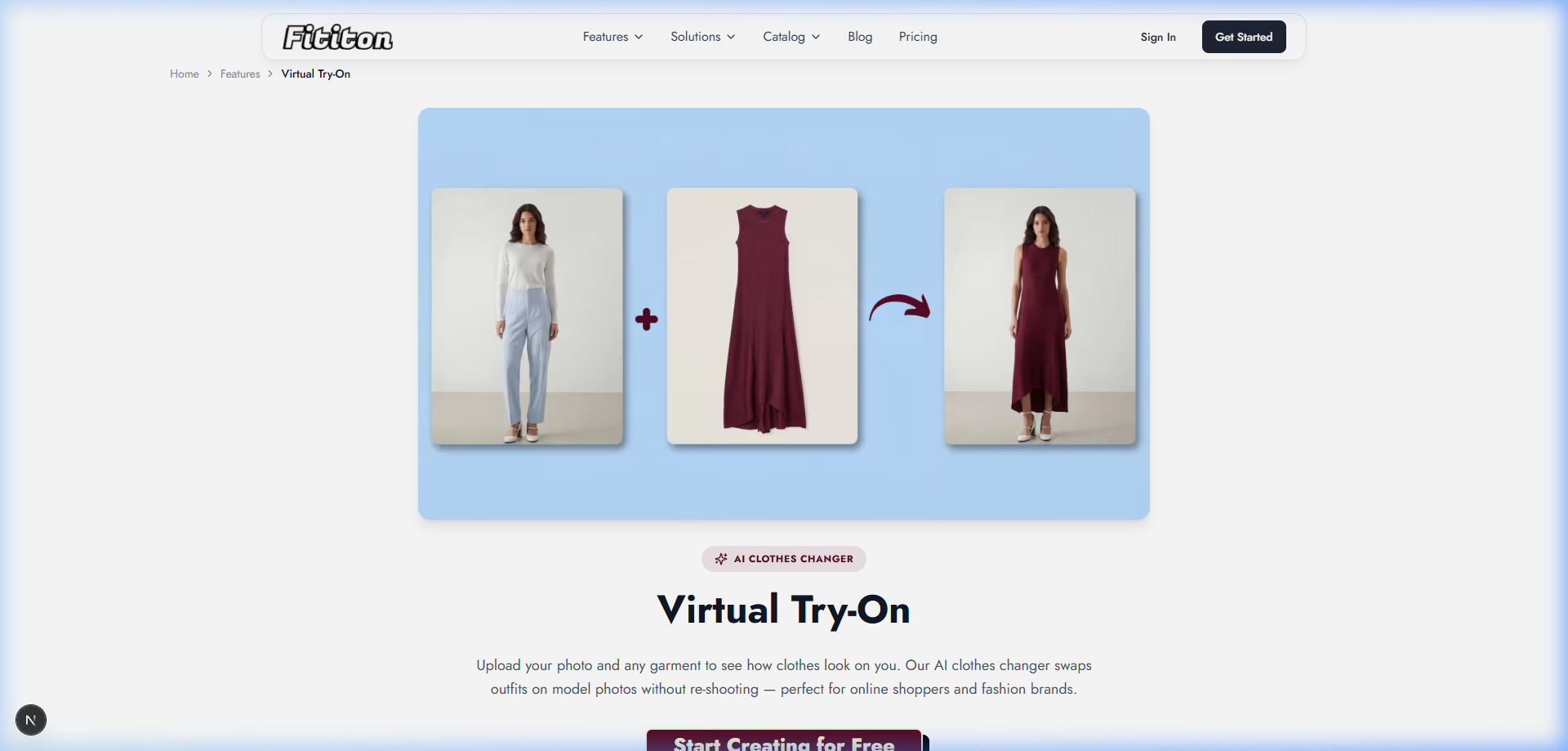
Fit It On is a comprehensive AI fashion photography platform that goes well beyond basic virtual try-on. Upload your garment photo — whether it's a flat-lay, packshot, or ghost mannequin shot — select from a diverse library of AI models, and generate professional on-model photos in under 30 seconds.
What sets Fit It On apart is the breadth of tools available in a single platform. Beyond standard virtual try-on, it offers product-to-model conversion, AI model creation from text prompts, pose control with reference images, consistent model identity across campaigns, and AI fashion video generation. It also includes free background removal and a Social Studio for creating content in platform-specific dimensions.
Key Features
- Virtual try-on with strong garment detail preservation (prints, textures, logos)
- 100+ pre-built diverse AI models with custom model creation (Pro plan and above)
- Product-to-model conversion from flat-lay, ghost mannequin, and packshot images
- AI pose control with reference-based generation
- Consistent model personas across multiple products and campaigns
- AI fashion video generation (4s, 6s, and 8s clips)
- Up to 4K output resolution with full commercial usage rights
- Built-in background removal and Social Studio tools
Pricing
- Free: 3 credits to try the platform
- Personal: $4.99/month (40 credits) — individual exploration
- Starter: $15/month (150 credits) — solo creators and boutiques
- Pro: $29/month (300 credits) — most popular, includes video + custom models
- Agency: $69/month (1,000 credits) — teams and high-volume studios
Best For
Fashion brands of all sizes, e-commerce sellers, small businesses producing product photos at scale, marketing agencies, and anyone who needs a complete AI visual content pipeline in one platform.
2. VModel — Simple Product-on-Model Generation
VModel focuses specifically on generating AI model photos from product images. It's a more focused tool compared to full-platform solutions — you upload a product image and the AI places it on a generated model in various poses and settings.
Key Features
- Product-on-model image generation
- Multiple model options (ethnicity, body type)
- Background generation and customization
- Batch processing for catalog workflows
Pricing
Free tier with limited generations; paid plans from approximately $15/month.
Best For
Sellers who need straightforward product-on-model photos without the full suite of fashion photography tools.
3. Botika — E-commerce Automation Focus
Botika positions itself as an AI product photography platform with emphasis on batch automation. Upload multiple product images and generate on-model results at scale, with a focus on e-commerce platform integration.
Key Features
- AI model generation for product photos
- Batch processing workflows
- Multiple model diversity options
- E-commerce platform integrations
Pricing
From approximately $29/month for basic plans, with enterprise options for high-volume users.
Best For
E-commerce businesses with large catalogs that need automated, batch-processed on-model imagery.
4. Zmo.ai — AI Models with Background Generation
Zmo.ai offers AI model generation combined with strong background creation capabilities. The platform can generate AI models wearing your products in various lifestyle and studio settings.
Key Features
- AI model photo generation
- Extensive background library and generation
- Multiple output formats
- API access for automation
Pricing
Free tier available; paid plans from approximately $8/month.
Best For
Brands that need strong lifestyle and environmental backgrounds paired with AI model photos.
5. Vue.ai — Enterprise Virtual Try-On
Vue.ai is an enterprise-focused AI platform that offers virtual try-on as part of a broader suite of retail AI tools including visual search, personalized styling, and catalog automation. It's designed for large retailers with dedicated engineering teams.
Key Features
- Enterprise virtual try-on API integration
- On-model imagery API for catalog automation
- Visual search and personalized styling tools
- Custom integration, SLA support, and dedicated account management
Pricing
Custom enterprise pricing — contact for quotes. Typically requires six-figure annual commitments.
Best For
Large retailers with dedicated engineering teams and enterprise budgets for visual AI infrastructure.
6. Outfit Anyone — Open-Source Virtual Try-On
Outfit Anyone is an open-source project that provides virtual try-on capabilities through a publicly available model. It works by taking a person image and a garment image, then generating a composite showing the garment on the person.
Key Features
- Open-source codebase for full customization
- Self-hosting option for data control
- Community-driven development and improvements
- No per-image licensing fees
Pricing
Free (open-source), but requires technical setup, GPU hosting costs, and ongoing maintenance.
Best For
Developers and technical teams who want to self-host, customize, and integrate a try-on solution into their own products.
How to Choose the Right Virtual Try-On Tool
Start With Your Primary Use Case
If your goal is producing on-model product photography at scale with a complete visual content pipeline, Fit It On provides the most comprehensive toolkit — try-on, product-to-model, model creation, pose control, video, and social content in one platform. If you need a simpler tool for product-on-model photos only, VModel or Zmo.ai may suffice. For enterprise-scale deployments with custom APIs and SLAs, Vue.ai handles that complexity.
Test With Your Hardest Products
The quality gap between tools is significant. Test each tool with your most complex garments — items with detailed prints, logos, or unusual fabrics. The tool that handles your hardest use cases well will handle everything else.
Think About Scalability
If you're managing a catalog of 500+ SKUs and refreshing seasonal collections, you need a tool that processes images quickly and offers credit-based pricing that scales. Calculate your monthly image needs before committing to a plan.
Consider the Full Content Pipeline
A tool that only does try-on means you'll need separate solutions for model creation, pose control, video, and social media content. Platforms that cover the full pipeline — like Fit It On — reduce tool fragmentation and keep your workflow streamlined.
FAQ
What is AI virtual try-on technology?
AI virtual try-on uses computer vision and generative AI to digitally place garments onto person images or AI-generated models. The technology analyzes the garment's shape, texture, and drape to create realistic on-body visualizations without a physical photoshoot.
Does virtual try-on work for all types of clothing?
Most tools work best with upper body garments (tops, shirts, jackets) and full-body outfits. Results vary for accessories, shoes, and very loose-fitting garments depending on the specific tool's capabilities. Always test with your specific product types.
Can I use AI virtual try-on images commercially?
This depends on the tool. Fit It On grants full commercial usage rights on all paid plans. Open-source solutions like Outfit Anyone may have different licensing terms. Always check the specific tool's terms of service before using images in commercial settings.
How much does virtual try-on cost per image?
Costs vary widely. With Fit It On, each try-on costs 1 credit — on the Pro plan ($29/month for 300 credits), that's roughly $0.10 per image. Enterprise solutions like Vue.ai have custom per-image pricing. Open-source options have no per-image cost but require hosting infrastructure.